AI Automation: How It Works, Benefits & Real-World Examples
Published: 5 Nov 2026
Imagine finishing hours of work in just a few minutes. Sounds great, right? Many businesses and people spend too much time on daily tasks like sending emails, managing data, and answering customer questions. But smart technology can now handle many of these tasks with less effort.
You will learn what AI automation is, how it works, and why it matters. We will explore real-life examples, popular AI automation tools, key benefits, common challenges, and simple ways to get started. You will also discover how businesses and beginners can use this technology to save time, reduce manual work, and improve results.
Whether you are a student, business owner, or someone new to AI, this guide will help you understand the basics and make smart choices. By the end, you will have a clear idea of how AI automation can make everyday work easier and more productive.
What Is AI Automation?
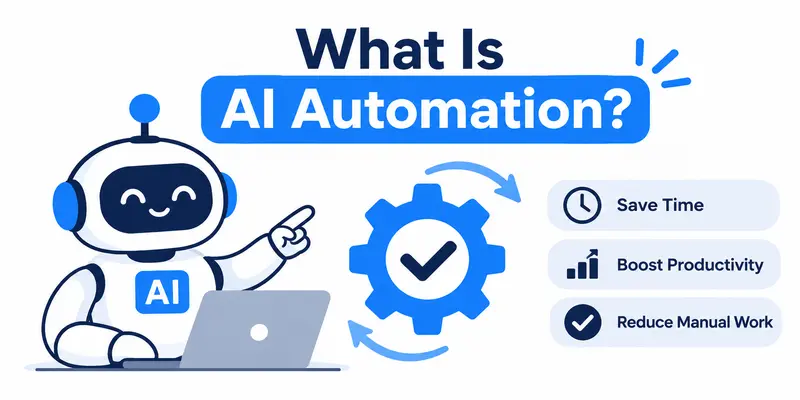
AI automation is the use of artificial intelligence (AI) to complete tasks with less human effort. It combines smart technology with automated processes to help people and businesses save time, reduce manual work, and improve productivity.
Traditional automation follows fixed rules. It performs the same steps every time. AI automation goes further. It can learn from data, understand information, find patterns, and make simple decisions.
For example, imagine you run an online store. Customers often ask questions about product prices, delivery times, and order status. An AI-powered chatbot can understand these questions and reply automatically. This saves time and helps customers get quick answers.
How Does AI Automation Work?
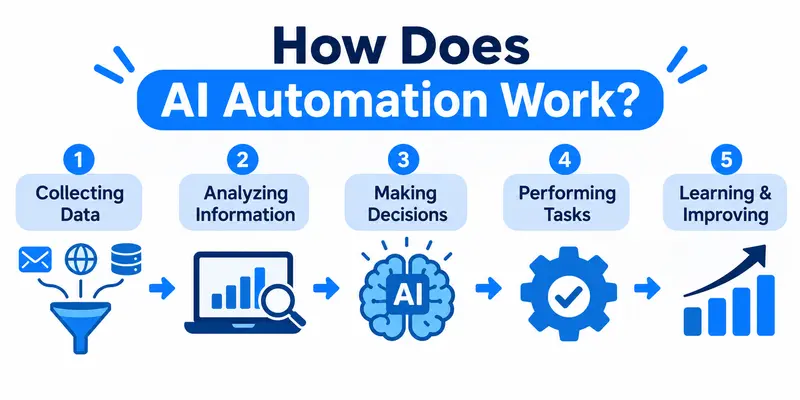
AI automation works by combining artificial intelligence with automated systems. It collects information, studies patterns, makes decisions, and performs tasks with less human effort.
Unlike traditional automation, AI automation can handle different types of information. It can understand text, recognize images, answer questions, and suggest actions.
Let’s understand how it works step by step.
1. Collecting Data
First, an AI system collects data from different sources. This data may come from emails, websites, customer messages, forms, or business records.
For example, an online store collects customer details, product orders, and delivery information. AI uses this data to understand customer needs.
2. Analyzing Information
Next, AI studies the collected data. It looks for patterns, finds useful details, and understands what the information means.
For example, an AI tool can check customer messages and identify common questions about prices, payments, and delivery.
3. Making Decisions
After analyzing the information, AI chooses a suitable action based on its training, instructions, and available data.
For example, an AI chatbot can understand that a customer wants to know the delivery date. It can then find the order details and prepare an answer.
4. Performing Tasks Automatically
Now, the automation system performs the selected task. It may send an email, update a record, create a report, or reply to a customer.
For example, an AI email tool can sort incoming emails, identify important messages, and suggest replies.
5. Learning and Improving
Some AI systems use feedback and new data to improve their results over time. This helps them recognize patterns and give better answers.
However, not every AI tool learns automatically. Some tools need updates, new training, or human feedback.
Types of AI Automation
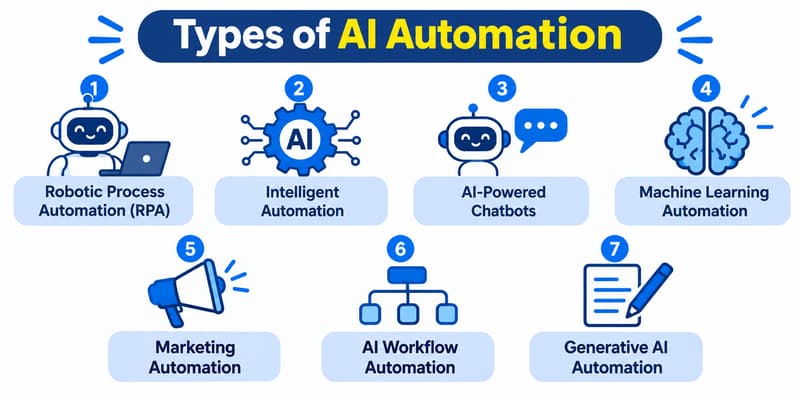
AI automation comes in different types. Each type helps people and businesses complete tasks with less manual work. Some tools handle simple tasks, while others can understand language, study data, and make decisions.
Let’s explore the main types of AI automation with simple examples.
1. Robotic Process Automation (RPA)
Robotic Process Automation (RPA) uses software robots to complete repeated tasks on a computer. It follows set rules and performs tasks that people usually do manually.
For example, an RPA tool can copy customer details from an email into a spreadsheet. It can also move data between different business systems.
Common uses:
- Data entry and data transfer.
- Invoice processing.
- Filling out online forms.
- Updating business records.
2. Intelligent Automation
Intelligent automation combines AI with traditional automation. It can understand information, process data, and handle tasks that need more than fixed rules.
For example, a company can use intelligent automation to read invoices, find important details, and send the information to its payment system.
Common uses:
- Document processing.
- Customer service.
- Business operations.
- Data collection and analysis.
3. AI-Powered Chatbots
AI chatbots use artificial intelligence to understand customer questions and provide helpful answers. They can communicate through websites, apps, and messaging platforms.
For example, a customer visits an online store and asks, “Where is my order?” An AI chatbot can check the available order details and provide an update.
Common uses:
- Customer support.
- Answering common questions.
- Booking appointments.
- Providing product information.
4. Machine Learning Automation
Machine learning automation uses computer systems that learn patterns from data. These systems use past information to make predictions and improve their results.
For example, an online shopping website can study customer activity and suggest products that match their interests.
Common uses:
- Product recommendations.
- Fraud detection.
- Sales predictions.
- Customer behavior analysis.
5. Marketing Automation
AI marketing automation helps businesses manage marketing tasks. It can study customer interests, create content ideas, and send personalized messages.
For example, an online store can send product offers to customers based on their previous purchases.
Common uses:
- Email marketing.
- Social media planning.
- Customer targeting.
- Personalized product offers.
6. AI Workflow Automation
AI workflow automation connects different apps and tools to complete tasks automatically. It reduces the need to move information between platforms manually.
For example, when someone fills out a contact form on your website, an automation system can save their details in Google Sheets and send them a welcome email.
Common uses:
- Connecting different apps.
- Sending automatic emails.
- Managing customer information.
- Creating reports.
- Organizing daily tasks.
7. Generative AI Automation
Generative AI automation uses AI models to create new content. It can produce text, images, summaries, ideas, and other useful materials.
For example, a blogger can use an AI writing tool to create article ideas, prepare outlines, and write first drafts.
Common uses:
- Blog writing.
- Image creation.
- Video scripts.
- Social media content.
- Email drafts.
Benefits of AI Automation
AI automation offers many benefits for people and businesses. It helps complete daily tasks faster, reduces manual work, and improves productivity. From small online stores to large companies, many businesses use AI automation to save time and manage their work more easily.
Let’s explore the main benefits of AI automation and see how it can make everyday work better.
- Saves Time: One of the biggest benefits of AI automation is time savings. It can handle repeated tasks in seconds or minutes. People no longer need to spend hours doing the same work every day.
- Reduces Human Errors: Manual work can lead to mistakes, especially when people handle large amounts of data. AI automation can follow instructions and process information with greater consistency.
- Increases Productivity:AI automation helps people complete more work in less time. It handles routine tasks so workers can focus on important activities.
- Reduces Business Costs: Businesses often spend money on repeated tasks and manual processes. AI automation can reduce some of these costs by handling routine work.
- Improves Customer Service: Customers want quick answers and helpful support. AI automation can respond to common questions at any time of the day.
- Works 24/7: Many AI-powered systems can run day and night without regular breaks. This helps businesses serve customers outside normal working hours.
- Handles Large Amounts of Data: Businesses collect information from customers, sales, websites, and other sources. AI automation can process large amounts of data and find useful patterns.
- Supports Better Decision-Making :AI automation can study information and provide useful insights. These insights help business owners understand trends and make better decisions.
- Improves Marketing Results: AI automation helps businesses manage marketing activities. It can organize customer groups, prepare email campaigns, and suggest personalized offers.
- Makes Business Growth Easier: As a business grows, its daily work also increases. AI automation can handle many repeated tasks without requiring the same increase in manual effort.
Real-World Examples of AI Automation
AI automation is not just a future idea. Many businesses already use it in their daily work. It helps companies save time, answer customer questions, manage information, and complete repeated tasks.
You may even use AI automation every day without noticing it. For example, email filters, shopping recommendations, and chatbots all use smart technology to make tasks easier.
Let’s explore some real-world examples of AI automation and see how different industries use it.
1. AI Automation in Online Shopping
Online shopping websites use AI automation to understand customer interests and improve the shopping experience.
AI systems study customer searches, previous purchases, and browsing activity. They use this information to suggest products that customers may like.
Common uses:
- Suggesting related products.
- Tracking customer orders.
- Answering common questions.
- Finding products based on customer interests.
3. AI Automation in Healthcare
Healthcare providers use AI tools to support medical staff and manage daily work. These tools can help organize patient information, analyze medical images, and prepare reports.
Common uses:
- Organizing patient records.
- Supporting medical image analysis.
- Managing appointments.
- Preparing medical reports.
4. AI Automation in Banking
Banks use AI automation to monitor transactions and identify unusual activity. These systems can study spending patterns and flag transactions that may involve fraud.
Common uses:
- Detecting unusual transactions.
- Monitoring account activity.
- Supporting customer service.
- Reviewing financial records.
5. AI Automation in Digital Marketing
Digital marketers use AI automation to manage campaigns, understand customer behavior, and create content.
Common uses:
- Sending automatic emails.
- Planning social media content.
- Creating marketing ideas.
- Grouping customers by interests.
- Tracking campaign results.
6. AI Automation in Education
Schools, colleges, and online learning platforms use AI tools to support students and teachers.
AI-powered systems can help students practice lessons, receive feedback, and find learning materials.
Common uses:
- Creating practice questions.
- Checking student answers.
- Supporting language learning.
- Recommending learning materials.
7. AI Automation in Transportation
Transportation companies use AI systems to study traffic, plan routes, and improve delivery services.
Common uses:
- Finding faster routes.
- Studying traffic conditions.
- Planning delivery routes.
- Supporting fleet management.
8. AI Automation in Human Resources (HR)
Companies use AI tools to manage some daily HR tasks. These tools can organize applications, answer employee questions, and help teams manage records.
Common uses:
- Organizing job applications.
- Managing employee records.
- Answering common HR questions.
- Scheduling interviews.
Best AI Automation Tools in 2026
AI automation tools help people and businesses complete daily tasks with less manual work. They can manage emails, create content, connect apps, answer customer questions, and organize business activities.
You do not need advanced technical skills to use many of these tools. Some offer simple drag-and-drop features, while others help you build advanced AI workflows.
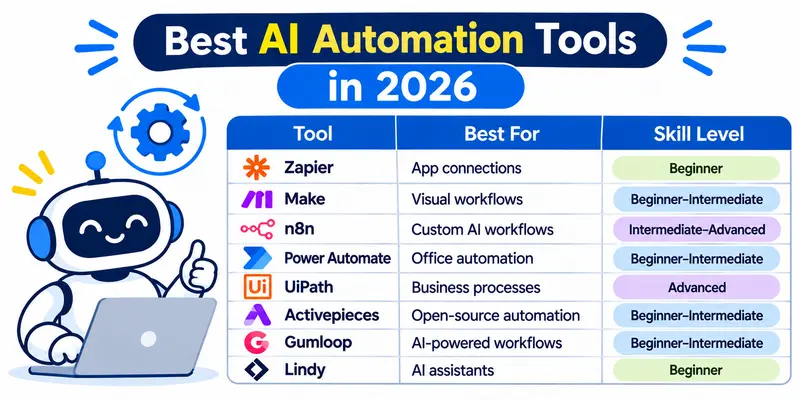
Quick Comparison of the Best AI Automation Tools
| Tool | Best For | Skill Level |
| Zapier | App connections | Beginner |
| Make | Visual workflows | Beginner–Intermediate |
| n8n | Custom AI workflows | Intermediate–Advanced |
| Power Automate | Office automation | Beginner–Intermediate |
| UiPath | Business processes | Advanced |
| Activepieces | Open-source automation | Beginner–Intermediate |
| Gumloop | AI-powered workflows | Beginner–Intermediate |
| Lindy | AI assistants | Beginner |
How to Start Using AI Automation as a Beginner
Starting with AI automation is easier than you may think. You do not need coding skills or technical experience. You can begin with simple tools and learn step by step.
Follow these steps to get started.
1. Understand the Basics
Learn these three important terms:
- Trigger: An event that starts automation.
- Action: A task the system performs.
- Workflow: A series of connected tasks.
For example, when someone fills out a form, automation can save their details in Google Sheets.
2. Choose a Beginner-Friendly Tool
Start with one simple tool:
- Zapier: Connects apps and automates tasks.
- Make: Builds visual automation workflows.
- n8n: Creates advanced AI workflows.
- ChatGPT: Helps create content and process information.
Tip: Start with Zapier or Make if you are a beginner.
3. Find Tasks to Automate
Choose simple tasks that you repeat every day.
For example:
- Sending emails.
- Saving customer details.
- Organizing data.
- Creating social media ideas.
- Summarizing documents.
4. Learn Triggers and Actions
Every basic workflow starts with a trigger and performs an action.
Example:
- Someone submits a website form.
- Automation collects their details.
- Their information appears in Google Sheets.
5. Build Your First Workflow
Try creating an automatic welcome email.
- Create an account on Zapier.
- Connect your email service.
- Choose a form submission as the trigger.
- Select sending an email as the action.
- Write your welcome message.
- Test and activate your workflow.
6. Practice With Small Projects
Try these beginner-friendly projects:
| Project | What You Learn |
| Automatic email sender | Email automation |
| Google Sheets saver | Data management |
| AI content summarizer | AI text processing |
| Social media idea generator | Content automation |
7. Learn Basic Skills
Focus on these useful skills:
- AI basics and prompt writing.
- Connecting different apps.
- Basic workflow logic.
- Understanding APIs.
- Testing and improving workflows.
8. Check Your Results
AI tools can make mistakes. Always test your workflows, protect private information, and review important results before using them.
Challenges and Risks of AI Automation
AI automation can save time, reduce manual work, and improve productivity. However, it also has some challenges and risks. Understanding these problems can help businesses and beginners use AI tools safely.
- High Initial Costs: Some AI automation tools require paid plans, setup costs, or technical support. This can be difficult for small businesses with limited budgets.
- Data Privacy and Security: AI tools may process customer details, business records, and other private information. Poor data protection can lead to privacy problems or data leaks.
- Risk of Incorrect Results: AI can misunderstand instructions or provide incorrect information. Always check important results before using them.
- Job Displacement: Automation can replace some repetitive tasks. This may reduce the need for certain roles and require workers to learn new skills.
- Technical Problems: Automation workflows may stop working because of software errors, app connection issues, or system updates. Regular testing and maintenance can help prevent these problems.
- Lack of Human Judgment: AI cannot always understand emotions, context, or complex situations. Human review is still important for sensitive tasks and major decisions.
- Bias in AI Decisions: AI systems can produce unfair results if they learn from biased data. Businesses should review AI decisions and check for unfair treatment.
- Overdependence on AI: Relying too much on automation can create problems when systems fail. Businesses should keep backup plans and human support available.
Future of AI Automation
AI automation is growing quickly and changing how people work and run businesses. In the future, AI tools may handle more daily tasks, make smarter decisions, and help people complete work faster.
Here are some important trends that may shape the future of AI automation.
- Smarter AI Agents: AI agents will handle tasks with less human guidance. They may manage emails, plan tasks, search for information, and complete multi-step workflows.
- More Automated Businesses: Businesses will use AI to manage customer support, sales, marketing, data, and daily operations. This can save time and reduce manual work.
- Growth of AI in Healthcare: AI automation may help doctors review medical information, organize patient records, and support early disease detection. Human experts will still make important decisions.
- Personalized Customer Experiences: AI will help businesses understand customer needs and offer more relevant products, services, and support.
- Better Human-AI Collaboration: AI will not only automate tasks. It will also work alongside people. Humans can focus on creative ideas, problem-solving, and important decisions.
- More Opportunities for New Skills: As automation grows, people will need skills such as AI tool management, prompt writing, data analysis, and workflow building.
- Stronger Focus on AI Safety: Businesses will need better ways to protect private data, reduce bias, and check AI-generated results. Human supervision will remain important.
Conclusion
AI automation is changing how people work and manage daily tasks. It helps save time, reduce manual work, improve productivity, and make business processes easier. From simple email tasks to advanced AI workflows, it offers useful solutions for beginners and businesses.
In this guide, we explored how AI automation works, its types, benefits, popular tools, real-world examples, and future opportunities. We also discussed its challenges, risks, and ways to get started. My recommendation is to begin with a simple task, choose a beginner-friendly tool like Zapier or Make, and learn through practice. You do not need advanced technical skills to take your first step.
Ready to explore AI automation? Choose one task you want to automate and try building your first workflow today. Also, share your thoughts in the comments: Which AI automation tool would you like to try first?
FAQs
Do you still have questions about AI automation? Here are some common questions beginners ask about its uses, benefits, costs, tools, and future. These simple answers will help you understand AI automation better and choose the right way to get started.
The main purpose of AI automation is to complete tasks faster with less manual effort. It combines artificial intelligence with automated workflows to handle tasks like reading messages, organizing data, and answering customer questions. This helps people focus on more important work.
Yes, AI automation can help small businesses save time and manage daily work more easily. They can use it for tasks such as:
- Sending customer emails.
- Managing orders.
- Organizing business data.
- Answering common questions.
- Planning marketing campaigns.
Small businesses can start with simple, low-cost tools.
Yes, many AI automation tools offer no-code features for beginners. Tools like Zapier and Make let you connect apps and create workflows using visual builders. You can start with simple tasks and learn more advanced features over time.
AI automation costs depend on the tool, features, and number of tasks you want to automate. Some platforms offer free plans with limited features, while paid plans provide more options. Compare pricing and limits before choosing a tool.
AI automation is important because it can help people and businesses handle growing workloads. It can improve productivity, support faster decisions, and create new opportunities for people with AI skills. Learning how to use these tools can help beginners prepare for changes in the workplace.
A business should consider AI automation when it spends too much time on repetitive tasks. Start by finding one task that follows a clear process, such as sending emails or organizing customer details. Test the workflow before using it for larger operations
AI automation can analyze information and handle tasks that need some understanding, while traditional automation mainly follows fixed rules.
- Traditional automation: Follows predefined steps, such as sending an email after a form submission.
- AI automation: Can understand a customer message, identify its purpose, and prepare a suitable reply.
Both can save time, but they solve different types of problems.
AI automation can replace some repetitive tasks, but it cannot fully replace human skills. People still bring creativity, emotional understanding, critical thinking, and personal judgment. In many workplaces, AI works best as a tool that supports employees rather than replacing them






- Be Respectful
- Stay Relevant
- Stay Positive
- True Feedback
- Encourage Discussion
- Avoid Spamming
- No Fake News
- Don't Copy-Paste
- No Personal Attacks
- Be Respectful
- Stay Relevant
- Stay Positive
- True Feedback
- Encourage Discussion
- Avoid Spamming
- No Fake News
- Don't Copy-Paste
- No Personal Attacks
